OPT Receipt Number Not Working—or Receipt Notice Missing?
Troubleshoot an invalid OPT receipt number, a missing I-797C notice, or an unavailable USCIS status without guessing what happened to your application.

Direct answer
If your OPT receipt number is not working, compare it with the I-765 receipt notice and try the official USCIS status tool without spaces or hyphens. An invalid result or failed lookup is not a verified pending case or a denial. If the receipt itself is missing, check the online account, filing records, and USCIS contact or nondelivery guidance.
What You Should Know First
- A USCIS receipt number is different from an A-Number, account number, SEVIS ID, or payment confirmation.
- A failed third-party lookup does not establish a USCIS decision.
- Preserve filing evidence and involve your DSO if an OPT deadline is close.
First, check which number you are entering
Find the notice or online-account record for your Form I-765. The USCIS receipt generally has three letters and ten digits. A SEVIS ID on the I-20, a USCIS online account number, an A-Number, and a payment reference serve different purposes. Typing one into the case-status field will not retrieve the OPT application.
Copy the receipt carefully and remove spaces or hyphens. Watch for characters introduced by a scan or copied PDF: an extra space, a letter mistaken for a digit, or text from the next line can change the input. Compare it with the document before trying several guesses. Never invent a receipt number from a delivery or payment reference.
Sources: Check your immigration case status
- Confirm the document belongs to Form I-765 and to you.
- Locate the field labeled receipt number.
- Compare every character with the original.
- Use the official USCIS tool to test the same number.
Distinguish an invalid number from an unavailable check
An invalid-number message, a temporarily unavailable website, and a third-party connection error are different problems. If the official tool returns a status but another service cannot retrieve it, the failed connection does not mean USCIS rejected the application. Record what each tool actually says and try again later if the service is unavailable.
If the official tool also cannot find the receipt, double-check the original notice and the online account. A recently issued receipt may not be visible everywhere immediately. There is no universal activation timer that lets a blog promise the exact hour it will appear. Persistent inconsistencies should be raised through the official contact process.
Keep screenshots of the error privately, with the date and tool used. Share sensitive documents only through an appropriate secure channel if an adviser needs them. Do not post your entire receipt in a group chat to ask strangers whether it looks valid.
Sources: Check your immigration case status
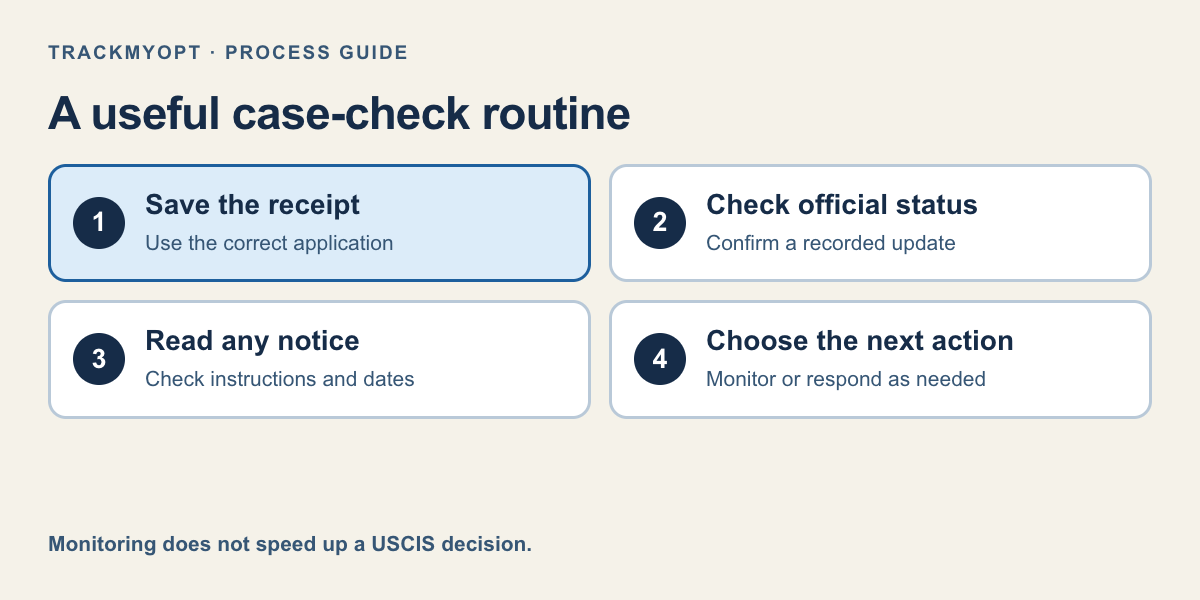
- 1. Save the receipt
- 2. Check official status
- 3. Read any notice
- 4. Choose the next action
If you filed online but cannot find the receipt notice
Sign in to the USCIS account used for the filing and review the case and Documents areas, where available. Check whether the application was actually submitted rather than left as a draft. Save the submission and payment records that exist; a draft or a payment screen alone should not be treated as a confirmed accepted filing.
Use the USCIS account-help or contact process when you cannot access the submitted case. Describe the problem precisely: account access, a missing notice, or a receipt the status tool cannot find. That is more useful than reporting only that “OPT is not working.” Your DSO can help you review the OPT timeline, but cannot repair a USCIS website account.
Sources: Instructions for Form I-765
If you mailed the application and no receipt arrived
Review the mailing receipt, delivery record, copy of the packet, payment information, and the address used. Delivery to a mailing facility is evidence of delivery; it is not an approval and does not by itself prove USCIS accepted the application. An application can also be rejected for a filing problem, so check for returned mail or an official rejection notice.
USCIS provides contact and lockbox-support guidance for receipt problems. Follow the current instructions for your filing situation rather than repeatedly sending a new application. A duplicate filing or an improvised correction may create additional problems. If your filing window is close to ending, contact your DSO and, where necessary, an immigration attorney promptly.
When you do have a receipt but the paper notice did not arrive, check the official e-Request nondelivery options and address records. The tool sets its own eligibility conditions. Do not assume that a fixed number of days quoted in a forum applies to every notice or every contact route.
Sources: Case inquiries and nondelivery requests; Instructions for Form I-765
Example: Dev enters his SEVIS ID instead of the receipt
Fictional example: Dev files an OPT I-765 online, then enters the number from the top of his I-20 into a case tracker. The lookup fails, and he worries the application was denied.
He opens the submitted I-765 case in his USCIS account and finds its receipt. He tests that number in the official status tool and sees a recorded receipt message. The problem was the identifier, not a negative USCIS decision. Dev saves the correct number and checks the notices in the account.
A different student might discover that the application remained a draft or that a mailed packet was returned. Those situations need different actions. The purpose of troubleshooting is to identify the actual problem before assuming every failure is just a harmless website delay.
Once the receipt works, use a simple monitoring routine
Keep the correct receipt and the original filing records together. Check the official status, read notices, and verify your address if you move. TrackMyOPT supports free manual checks and Pro daily monitoring with email when a change is detected. It cannot recover a missing filing or replace USCIS account support.
Only treat the case as verified pending when a successful lookup supports that status. Unknown results and connection failures should remain unknown. This distinction helps you choose the right next step and keeps estimates from being built on a case state that was never confirmed.
Your Action Checklist
Common Mistakes to Avoid
- Assuming an error message means the case is denied.
- Treating a delivery scan or payment record as an approval.
- Filing a duplicate application before understanding the problem.
Keep your USCIS case in one place
Save your receipt for free manual checks. Pro adds daily USCIS checks and email alerts when we detect a status change.
Also see USCIS case status tracker features
Frequently Asked Questions
Is my SEVIS ID the same as my USCIS receipt?
No. A SEVIS ID identifies the student record. The USCIS receipt identifies the application or petition in the USCIS case-status system.
Does an invalid receipt mean my OPT was denied?
No. It may indicate the wrong number or a lookup problem. A USCIS decision must be verified from the official status or notice.
How long does a new receipt take to appear?
Visibility can vary. This guide does not promise a fixed activation period. Compare the notice and account, and use official support for a persistent mismatch.
Should I submit another I-765 if my receipt is missing?
Do not assume a duplicate filing is the solution. Review filing evidence and current USCIS contact guidance with your DSO or an attorney, especially near a deadline.
Official Sources
Rules can change. We checked this guide against the primary sources below; always open the current form instructions or agency page before acting.
Keep Reading
Written by Vinay Kumar
Vinay is a content writer at TrackMyOPT who specializes in immigration guidance for international students. All content is researched using official USCIS, SEVP, and Department of Labor sources and reviewed for accuracy by the TrackMyOPT team, which includes former F-1 students who navigated OPT, STEM OPT, and H-1B transitions firsthand.