USCIS myProgress Says “Taking Longer Than Expected” for OPT—What Now?
Understand the USCIS myProgress estimate for OPT, what a changed countdown means, and how to plan your next step without treating it as a deadline.

Direct answer
“Taking longer than expected” in USCIS myProgress is an estimate update, not a denial or a guaranteed new deadline. Check your I-765 status and documents, look for any action-required notice, and use the public USCIS processing-times inquiry tool to see whether you can request an update.
What You Should Know First
- myProgress estimates may move, disappear, or be inaccurate for an individual case.
- A shorter estimate does not authorize work or guarantee an EAD arrival date.
- Inquiry eligibility comes from the public processing-times tool, not the myProgress countdown.
What myProgress measures—and what it cannot tell you
USCIS introduced myProgress for eligible online-account cases, including Form I-765, to show an estimated wait for certain milestones. Its announcement explains that the estimate draws on historical patterns in similar cases. Individual circumstances can make the estimate too short or too long; it is not a promise that an officer will decide your case on a particular date.
Availability and the account interface can differ by case. If you do not see a myProgress tab, that fact alone is not a negative decision. Use the case status and notices that are available to you. Avoid searching for a hidden meaning in every interface change when no USCIS notice supports that interpretation.
Sources: USCIS Expands myProgress to Form I-765 and Form I-131
Estimate, official status, and processing time are different
The easiest way to avoid confusion is to give each information source a separate job. myProgress is an individual planning estimate. Case Status Online describes a recorded action on your receipt. The public processing-times tool describes a group of completed cases and provides the process for checking whether an inquiry is available.
None of these is a substitute for the full notice. A request for evidence may have a response deadline even while a dashboard still shows a long wait. An approval may be followed by separate card-production and mailing steps. Checking only the countdown can cause you to miss the information that actually requires action.
Sources: USCIS Expands myProgress to Form I-765 and Form I-131; Processing Times FAQs
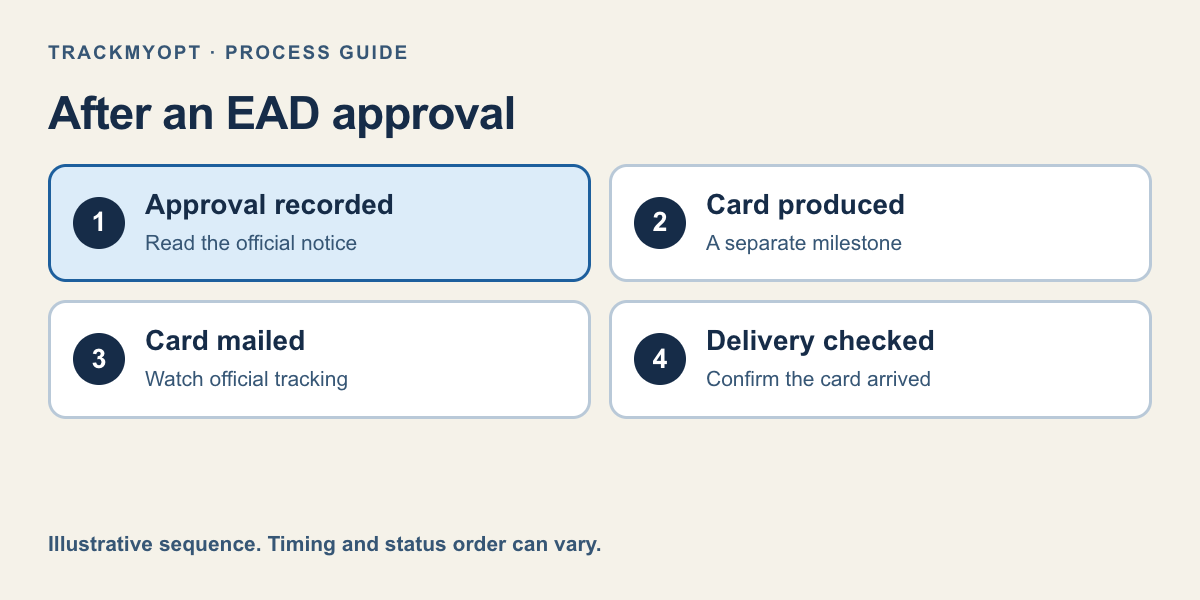
- 1. Approval recorded
- 2. Card produced
- 3. Card mailed
- 4. Delivery checked
- myProgress: a changing estimate, not a filing or work deadline.
- Case status and documents: recorded actions and notices.
- Public processing tool: the correct comparison and inquiry eligibility.
- EAD and applicable rules: the documents and dates that govern work.
What to do when the countdown reaches zero or changes
First, check the status and Documents area, where available, for a new notice. If there is an RFE, biometrics appointment, or other request, follow the instructions in that notice. Do not send random extra evidence simply because an estimate changed; it may not address any issue USCIS has identified.
Second, open the public processing-times tool. Select Form I-765, the correct OPT category, and the office or grouping the tool requests. Use the receipt date to check the inquiry date. Keep the result and the date you checked it so you can explain the situation accurately to your DSO or a USCIS contact.
Third, review your practical plan. Tell an employer that the application is pending and distinguish the requested OPT start date from the authorization you ultimately receive. Arrange flexibility before promising a first workday. A forum comment about someone else’s approval cannot determine your lawful start date.
Sources: Check Case Processing Times; Optional Practical Training for F-1 Students
- Read current status and available notices.
- Act on any specific request and its deadline.
- Check official inquiry eligibility.
- Update your employer and DSO with facts, not an estimated approval promise.
Example: Maya’s estimate changes from one week to longer
Fictional example: Maya has a pending post-completion OPT application. Her account first estimates one week, then displays “taking longer than expected.” She has already told a recruiter she hopes to start soon.
Maya checks the official status and finds no new request. She checks the public inquiry tool and asks her DSO to review her OPT dates. She then tells the recruiter that she cannot confirm a start date from myProgress alone. She keeps checking notices while discussing a flexible start with the employer.
If Maya later receives approval, she still checks the EAD dates and delivery. If she receives an RFE instead, she follows that notice. Both outcomes are possible; an animation or a countdown cannot decide which will happen.
Should you consider premium processing or an estimate tool?
Eligible F-1 OPT/STEM I-765 filings have a premium-processing option through Form I-907. As of this update, the additional fee is $1,780 and the applicable action period is 30 business days, subject to the governing rules. This is an optional USCIS service, separate from any TrackMyOPT subscription. It does not promise approval or card delivery within that period.
Use community timelines as a second planning reference only when the comparison fits your case. TrackMyOPT’s OPT decision-window tool shows an estimated range and sample information when enough comparable data exists. A small or mismatched sample is a reason for caution, not a reason to manufacture an exact date.
Daily monitoring can save repeated manual checks, but it cannot speed up adjudication. Keep your planning estimate, official notices, and work-authorization requirements separate. That gives you a clearer next step even when the wait itself remains uncertain.
Sources: 8 CFR 106.4: Premium processing service; Form I-907 Premium Processing
Your Action Checklist
Common Mistakes to Avoid
- Treating a countdown as a promised approval date.
- Starting work because myProgress reached zero.
- Comparing regular OPT with an unrelated form or premium case.
Check your OPT or STEM OPT wait
Enter your receipt date for a free community-based estimate — no account needed. If enough comparable cases are available, see the sample size and range; then save your case for ongoing tracking.
Also see USCIS case status tracker features
Decision windows are community planning estimates — not legal advice or a USCIS-guaranteed decision date. Terms
Frequently Asked Questions
Does “taking longer than expected” mean my OPT will be denied?
No. That estimate message alone is not a decision. Read the official case status and any notices to determine what USCIS has actually recorded.
Can I submit an inquiry when myProgress runs out?
A myProgress countdown does not establish inquiry eligibility. Use the public USCIS processing-times tool and its receipt-date inquiry process.
Why did my estimated time increase?
USCIS says the estimate can understate or overstate the wait for an individual case. A changed estimate alone does not explain what happened inside your case.
Can TrackMyOPT replace myProgress?
It offers a separate OPT/STEM community planning estimate and case tracking. It does not replace USCIS notices, decide eligibility, or guarantee a decision date.
Official Sources
Rules can change. We checked this guide against the primary sources below; always open the current form instructions or agency page before acting.
Keep Reading
Written by Vinay Kumar
Vinay is a content writer at TrackMyOPT who specializes in immigration guidance for international students. All content is researched using official USCIS, SEVP, and Department of Labor sources and reviewed for accuracy by the TrackMyOPT team, which includes former F-1 students who navigated OPT, STEM OPT, and H-1B transitions firsthand.